WordPress has powered websites for more than two decades and continues to be the world's most widely used Content Management System (CMS). Traditionally, it has provided everything required to build and run a website—content management, themes, plugins, user authentication, and frontend rendering—all within a single application.
For many projects, this traditional approach works exceptionally well. Businesses can publish content, manage users, install plugins, and customize the appearance of their website without worrying about multiple applications or complex integrations.
However, modern web development has changed significantly.
Today's users expect websites that load instantly, provide smooth interactions, and work consistently across multiple devices and platforms. At the same time, businesses are publishing content not only to websites but also to mobile applications, digital kiosks, smart TVs, customer portals, and other digital experiences.
These changing requirements have led to the growing adoption of Headless WordPress.
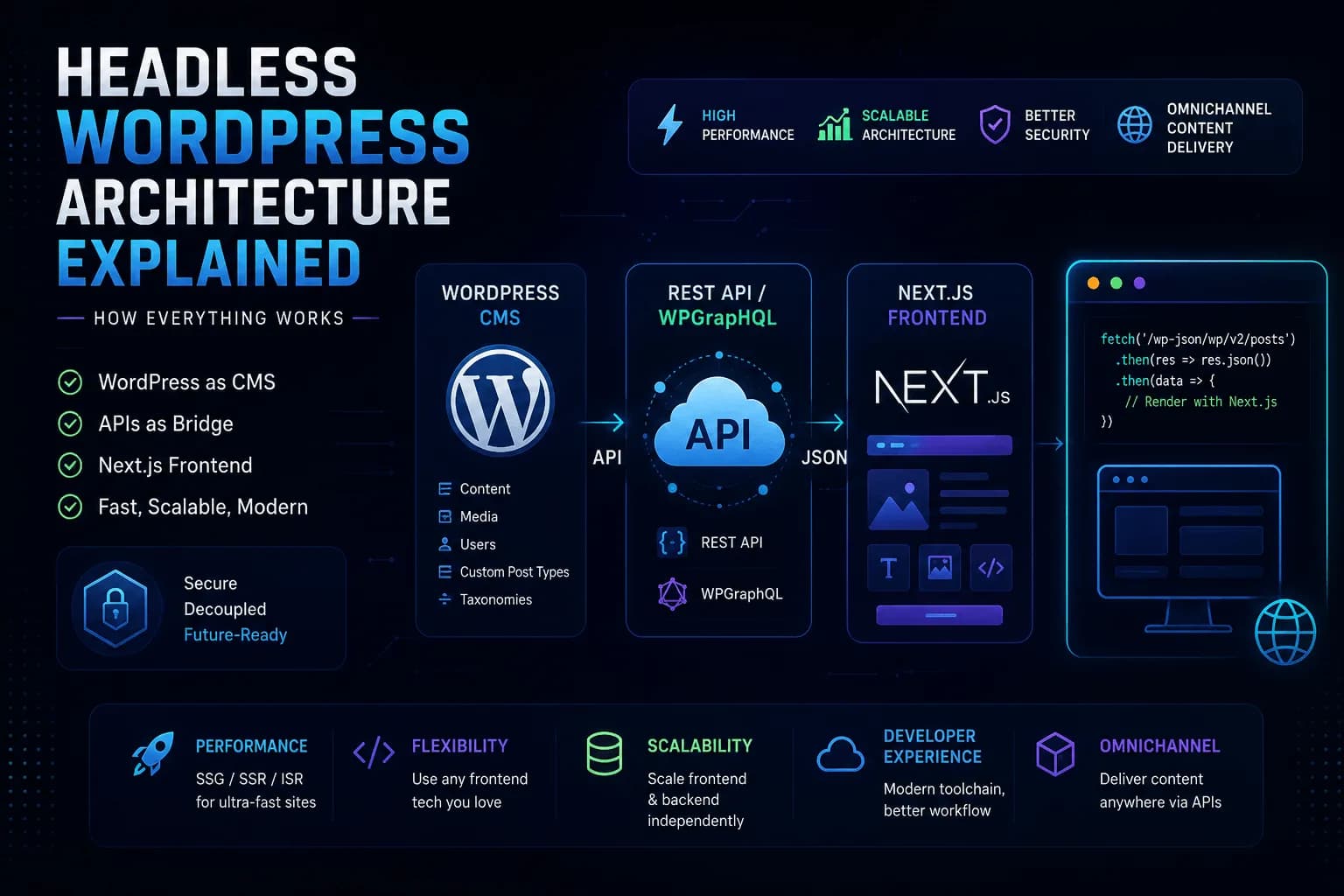
Instead of allowing WordPress to handle both content management and frontend presentation, Headless WordPress separates these responsibilities into two independent applications. WordPress becomes responsible for managing content, while a modern frontend framework—such as Next.js—retrieves that content through an API and renders the user interface.
This separation gives developers greater flexibility, improved performance, and the freedom to build highly customized digital experiences while still benefiting from WordPress' powerful content management capabilities.
In this guide, we'll explore how Headless WordPress architecture works, understand the role of each component, and examine how modern frameworks interact with WordPress to deliver fast, scalable, and maintainable web applications.
What Is Headless WordPress?
To understand Headless WordPress, it's helpful to first understand how a traditional WordPress website works.
In a standard WordPress installation, everything runs inside the same application.
WordPress stores your content in a database, processes incoming requests, loads plugins, selects the appropriate theme template, generates HTML, and finally sends the completed page to the visitor's browser.
The CMS and the frontend are tightly connected.
A simplified architecture looks like this:
Visitor
    │
    ▼
WordPress
    │
 ┌──┴──┐
 │     │
CMS  Theme
 │     │
 └──┬──┘
    ▼
Database
Whenever someone visits a page, WordPress is responsible for both retrieving the content and rendering the final website.
Headless WordPress takes a different approach.
Instead of rendering pages itself, WordPress focuses solely on managing content. The frontend is developed separately using technologies such as Next.js, React, Vue, Astro, or another modern framework.
Communication between the two happens through APIs.
The architecture now looks like this:
Content Editors
        │
        ▼
WordPress CMS
        │
 REST API / WPGraphQL
        │
        ▼
Next.js Application
        │
        ▼
Website Visitors
In this setup, WordPress no longer controls how the website looks. It simply stores and delivers content.
The frontend application decides how that content is displayed.
This separation is what makes WordPress "headless." The "head"—the presentation layer—is removed from WordPress and replaced with an independent frontend.
Why Did Headless WordPress Become Popular?
The rise of JavaScript frameworks has changed how developers build modern websites.
Frameworks like Next.js allow developers to build applications that are faster, more interactive, and easier to scale than many traditional server-rendered websites.
At the same time, businesses increasingly need to deliver content across multiple platforms.
Consider a company that publishes product information.
That same content might need to appear on:
The company website
A customer portal
A mobile application
A digital kiosk
A smartwatch application
An internal dashboard
Managing separate copies of the same content quickly becomes difficult.
With Headless WordPress, content is managed once inside WordPress and then delivered to multiple applications through APIs.
Rather than treating WordPress as a website builder, developers use it as a centralized content management platform.
This approach allows content editors to continue using the familiar WordPress admin interface while developers build completely custom frontend experiences using the technologies best suited to their project.
Traditional WordPress vs Headless WordPress
Although both approaches use WordPress, they solve different problems.
In a traditional WordPress website, a visitor requests a page and WordPress performs almost everything.
It queries the database, executes plugins, loads the active theme, generates HTML, and returns the completed page.
The entire lifecycle happens inside WordPress.
With Headless WordPress, the responsibilities are divided.
WordPress manages content.
The frontend application requests that content through an API.
It then processes the data and renders the final interface for the user.
Instead of one application handling every responsibility, each component focuses on what it does best.
WordPress becomes the content engine.
Next.js becomes the presentation layer.
Although this architecture introduces additional complexity, it also provides significantly greater flexibility.
The Core Components of Headless WordPress
A Headless WordPress project is built from several independent components working together.
Understanding the role of each one makes the overall architecture much easier to understand.
WordPress as the Content Management System
Even in a Headless architecture, WordPress remains at the center of content management.
Editors continue using the familiar WordPress dashboard to:
Create pages
Publish blog posts
Manage media
Update menus
Create custom post types
Manage taxonomies
Install plugins
Control user permissions
From a content editor's perspective, very little changes.
The biggest difference is that WordPress no longer renders the public-facing website.
Instead, it simply provides structured content through APIs.
This separation allows editors and developers to work independently without interfering with one another.
The API Layer
The API acts as the communication bridge between WordPress and the frontend application.
When content is requested, WordPress doesn't generate HTML.
Instead, it returns structured data, usually in JSON format.
For example, requesting a blog post might return something like:
{
  "title": "Headless WordPress Architecture Explained",
  "content": "...",
  "author": "Araib",
  "published": "2026-08-05"
}
The frontend application receives this data and decides how it should be presented.
Most Headless WordPress projects use one of two approaches:
WordPress REST API
WPGraphQL
We'll compare both approaches in a dedicated article, but it's important to understand that both serve the same purpose—they expose WordPress content to external applications.
The Frontend Application
The frontend is responsible for everything visitors see and interact with.
Instead of using PHP templates, developers build the interface using modern frontend frameworks.
Today, Next.js has become one of the most popular choices for Headless WordPress because it offers excellent performance, flexible rendering strategies, built-in routing, image optimization, and strong SEO capabilities.
Other frameworks such as React, Vue, Astro, Nuxt, and SvelteKit can also be used depending on the project's requirements.
The frontend receives structured content from WordPress and transforms it into a fully functional website.
This gives developers complete control over layouts, animations, navigation, performance optimization, and the overall user experience.
Why Developers Choose Headless WordPress
The decision to build a Headless WordPress application isn't simply about following modern development trends.
It usually comes down to solving specific technical or business requirements.
For developers, Headless WordPress offers the flexibility to work with modern frontend technologies while continuing to use WordPress as a proven and familiar CMS.
For businesses, it provides a scalable way to manage content centrally while delivering it across multiple digital platforms.
Instead of forcing WordPress to handle every aspect of the application, each component focuses on its own responsibility.
WordPress manages content.
The frontend delivers user experiences.
APIs connect the two.
This separation results in an architecture that is easier to scale, easier to customize, and better suited for modern web applications.
How Headless WordPress Architecture Works
Understanding the individual components of a Headless WordPress application is one thing, but seeing how they work together in practice makes the architecture much easier to understand.
In a Headless setup, WordPress is responsible for managing content, while the frontend handles how that content is presented to visitors. The two communicate through APIs, allowing each application to focus on its own responsibility.
Let's follow the complete lifecycle of a page request.
Publishing Content in WordPress
The journey begins exactly where it does in a traditional WordPress website.
A content editor logs into the WordPress dashboard, creates a post, uploads images, assigns categories, and clicks Publish.
The content is stored inside the WordPress database, ready to be accessed through the REST API or WPGraphQL.
From the editor's perspective, nothing changes. They continue using the familiar WordPress interface, while the frontend remains completely separate.
Retrieving Content Through the WordPress REST API
Once the content is published, the frontend needs a way to retrieve it.
WordPress provides this through its built-in REST API.
For example, fetching all blog posts is as simple as making an HTTP request.
async function getPosts() {

    const response = await fetch(
        'https://example.com/wp-json/wp/v2/posts'
    );

    if (!response.ok) {
        throw new Error('Failed to fetch posts');
    }

    return response.json();

}
When this request is made, WordPress doesn't return HTML. Instead, it returns structured JSON containing the post data.
A simplified response might look like this:
[
    {
        "id": 101,
        "slug": "headless-wordpress-architecture",
        "title": {
            "rendered": "Headless WordPress Architecture Explained"
        },
        "content": {
            "rendered": "<p>...</p>"
        }
    }
]
This structured response gives the frontend complete freedom to decide how the content should be displayed.
Fetching a Single Post
Most websites use dynamic URLs such as:
/blog/headless-wordpress-architecture
When a visitor opens one of these pages, Next.js retrieves the post using its slug.
async function getPost(slug: string) {

    const response = await fetch(
        `https://example.com/wp-json/wp/v2/posts?slug=${slug}`
    );

    if (!response.ok) {
        throw new Error('Unable to load post');
    }

    const posts = await response.json();

    return posts[0];

}
Instead of relying on WordPress templates like single.php, the frontend decides how every page should be rendered.
Rendering the Content in Next.js
Once the data has been retrieved, rendering the page becomes straightforward.
A simple Server Component might look like this:
export default async function BlogPost({

    params,

}: {

    params: {
        slug: string;
    };

}) {

    const post = await getPost(params.slug);

    return (

        <article>

            <h1>{post.title.rendered}</h1>

            <div
                dangerouslySetInnerHTML={{
                    __html: post.content.rendered,
                }}
            />

        </article>

    );

}
Although the content originates from WordPress, the HTML sent to the visitor is generated by Next.js.
This separation allows developers to build completely custom interfaces while continuing to use WordPress as the content management system.
Understanding the Request Lifecycle
The complete flow now looks like this:
Visitor
     │
     ▼
Next.js Route
     │
     ▼
Fetch WordPress API
     │
     ▼
WordPress Database
     │
     ▼
JSON Response
     │
     ▼
Next.js Renders HTML
     │
     ▼
Browser
Unlike a traditional WordPress website, the browser never communicates directly with WordPress templates.
Instead, WordPress becomes a data provider while Next.js acts as the rendering engine.
Rendering Strategies
One of the biggest reasons developers choose Next.js for Headless WordPress is the flexibility it provides when rendering pages.
Rather than relying on a single rendering method, developers can choose the approach that best fits each page.
Server-Side Rendering (SSR)
Server-Side Rendering generates the page every time a request is received.
export const dynamic = 'force-dynamic';
This approach is useful for pages that contain frequently changing information, such as dashboards, account pages, or search results.
Since the content is generated for every request, visitors always receive the latest data.
Static Site Generation (SSG)
For content that changes infrequently, such as blog posts or documentation, static generation is often the better choice.
Next.js can generate pages during the build process.
export async function generateStaticParams() {

    const posts = await getPosts();

    return posts.map((post: any) => ({

        slug: post.slug,

    }));

}
The generated HTML is deployed with the application, allowing pages to be served almost instantly without querying WordPress on every request.
Incremental Static Regeneration (ISR)
Many websites need both speed and fresh content.
Incremental Static Regeneration provides a balance between the two.
export const revalidate = 3600;
This tells Next.js to regenerate the page every hour.
The first visitor after the revalidation period receives freshly generated content, while everyone else continues to enjoy fast static pages.
For blogs, documentation websites, and marketing pages, ISR often provides the best combination of performance and content freshness.
Using WPGraphQL Instead of the REST API
Some Headless WordPress projects prefer WPGraphQL because it allows developers to request only the fields they need.
A simple GraphQL query might look like this:
query GetPost($slug: ID!) {

    post(
        id: $slug,
        idType: SLUG
    ) {

        title
        content
        date
        featuredImage {
            node {
                sourceUrl
            }
        }

    }

}
Instead of receiving a large JSON response containing unnecessary fields, the frontend receives exactly the data requested.
This becomes particularly useful as applications grow in complexity.
Authentication
Not every request made to WordPress is public.
Some operations require authentication, such as:
Previewing unpublished content
Updating user profiles
Accessing protected resources
Managing customer dashboards
Depending on the project, developers may use:
The authentication method depends on the application's architecture, but the overall concept remains the same: the frontend securely communicates with WordPress through authenticated API requests whenever protected data is required.
Deploying the Architecture
One of the biggest advantages of Headless WordPress is that the backend and frontend can be deployed independently.
A typical production architecture looks like this:
Content Editors
        │
        ▼
WordPress CMS
        │
        ▼
REST API / WPGraphQL
        │
        ▼
Next.js Application
        │
        ▼
CDN
        │
        ▼
Visitors
This separation allows developers to update the frontend without affecting WordPress and vice versa. It also enables each component to scale independently, making the architecture well suited for larger applications and high-traffic websites.
Advantages, Challenges, and Best Practices for Headless WordPress
By now, we've explored what Headless WordPress is and how its architecture works. We also followed the complete journey of content—from being created in WordPress to being rendered by a frontend framework like Next.js.
However, before deciding to adopt this architecture, it's important to understand that Headless WordPress isn't automatically the right choice for every project.
Like any architectural decision, it comes with both advantages and trade-offs. Understanding these will help you choose the right solution based on your project's requirements rather than simply following current development trends.
Benefits of Headless WordPress
One of the main reasons developers adopt Headless WordPress is the flexibility it provides.
Instead of being limited by a traditional WordPress theme, the frontend can be built using modern technologies that better suit the application's requirements.
Better Performance
Performance is often one of the biggest motivations for choosing a Headless architecture.
Frameworks such as Next.js provide features like:
Static Site Generation (SSG)
Server-Side Rendering (SSR)
Incremental Static Regeneration (ISR)
Image Optimization
Route-based code splitting
These techniques allow pages to load significantly faster while reducing unnecessary server processing.
Combined with CDN caching, visitors often receive pre-rendered pages instead of waiting for WordPress to generate HTML for every request.
Greater Frontend Flexibility
Traditional WordPress themes rely on PHP templates and the WordPress template hierarchy.
Headless WordPress removes this limitation.
Developers can build completely custom user experiences using technologies such as:
Next.js
React
Vue
Astro
Nuxt
SvelteKit
This provides greater control over layouts, animations, state management, and component architecture.
The frontend becomes an independent application instead of a collection of PHP templates.
Better Scalability
Separating the frontend from WordPress also makes scaling easier.
For example:
WordPress can be optimized purely for content management.
The frontend can scale independently.
API caching can be configured separately.
Static assets can be distributed through a CDN.
Rather than upgrading a single server to handle increasing traffic, each component can evolve independently based on demand.
Omnichannel Content Delivery
Modern businesses rarely publish content to a single website.
The same content may also appear on:
Mobile applications
Customer portals
Digital displays
Smart devices
Internal dashboards
Third-party applications
With Headless WordPress, content is managed once and delivered wherever it's needed through APIs.
This makes WordPress a centralized content hub instead of simply a website builder.
Challenges of Headless WordPress
Although Headless WordPress offers many advantages, it also introduces additional complexity.
Understanding these challenges is just as important as understanding its benefits.
Increased Development Complexity
A traditional WordPress website is typically a single application.
Headless WordPress introduces multiple applications that must communicate with each other.
A typical project now includes:
WordPress
Frontend framework
API layer
Deployment pipeline
Build process
Hosting infrastructure
Each component must be configured, maintained, and monitored independently.
For small business websites, this additional complexity may not be justified.
Plugin Compatibility
One of WordPress' greatest strengths is its plugin ecosystem.
However, many plugins assume WordPress is responsible for rendering the frontend.
Examples include:
Page builders
Popup plugins
Shortcode-heavy plugins
Theme-dependent plugins
These plugins may not work as expected in a Headless environment because the frontend no longer uses WordPress templates.
When building Headless applications, developers should evaluate plugins based on whether they expose data through APIs rather than whether they render frontend functionality.
Preview and Editorial Workflow
Content editors often expect to click the Preview button and immediately view unpublished changes.
While Headless WordPress supports preview functionality, implementing it usually requires additional development.
Developers need to build secure preview routes that fetch draft content and display it correctly within the frontend application.
Although this is entirely achievable, it isn't available automatically like it is in traditional WordPress themes.
Higher Development Costs
A Headless WordPress project generally requires knowledge of multiple technologies.
Developers often need experience with:
WordPress
PHP
JavaScript
React
Next.js
REST APIs or GraphQL
Deployment platforms
Because the architecture is more sophisticated, development time and project costs are typically higher than those of a traditional WordPress website.
SEO Considerations
One of the biggest concerns businesses have when considering Headless WordPress is SEO.
Many assume separating the frontend from WordPress will negatively impact search rankings.
Fortunately, modern frameworks such as Next.js provide excellent SEO capabilities.
Developers can generate:
Dynamic metadata
Open Graph tags
Canonical URLs
Structured data
XML sitemaps
Robots.txt
For example, generating page metadata in Next.js is straightforward.
export async function generateMetadata() {

    return {

        title: 'Headless WordPress Architecture',

        description:
            'Learn how Headless WordPress works.',

    };

}
As long as SEO is implemented correctly, a Headless website can perform just as well—or even better—than a traditional WordPress website.
The architecture itself isn't what determines SEO success.
Implementation does.
Security Considerations
Separating the frontend from WordPress also changes the application's security model.
Since visitors interact primarily with the frontend application, the WordPress backend becomes less exposed to the public internet.
However, APIs introduce their own security responsibilities.
Developers should:
Secure authenticated endpoints.
Validate incoming requests.
Protect API credentials.
Restrict unnecessary endpoints.
Implement rate limiting where appropriate.
Follow the principle of least privilege for API access.
A Headless architecture can improve security, but only when API security is treated as a first-class concern.
Common Mistakes Developers Make
As Headless WordPress becomes more popular, a few implementation mistakes appear repeatedly.
Choosing Headless Without a Clear Reason
Not every website benefits from a Headless architecture.
If a standard WordPress installation already satisfies the project's requirements, introducing another application may only increase complexity without delivering meaningful benefits.
Architecture should always solve a problem—not create one.
Treating WordPress Like a Traditional Theme
Some developers continue building WordPress as though it's responsible for the frontend.
Instead, WordPress should focus entirely on:
Content management
Business logic
API endpoints
User management
The frontend should handle presentation.
Keeping these responsibilities separate results in cleaner, more maintainable applications.
Overfetching Data
Fetching unnecessary data from the API increases response sizes and slows applications.
Instead of requesting everything, retrieve only the content required for the current page.
Whether using the REST API or WPGraphQL, keeping responses focused improves both performance and maintainability.
Ignoring Caching
Every request to WordPress consumes server resources.
Without proper caching, the frontend may repeatedly request identical content.
Depending on the project, developers should consider caching:
API responses
Images
Static pages
Server-side requests
A well-designed caching strategy is often one of the biggest contributors to Headless WordPress performance.
When Should You Choose Headless WordPress?
Headless WordPress is an excellent choice when:
Performance is a high priority.
The frontend requires extensive customization.
Content must be shared across multiple platforms.
Multiple frontend applications consume the same content.
Your team has experience with modern JavaScript frameworks.
Long-term scalability is an important requirement.
Projects such as SaaS platforms, enterprise websites, customer portals, documentation platforms, and content-heavy applications often benefit from this architecture.
When Traditional WordPress Is the Better Choice
Headless WordPress isn't always the best solution.
A traditional WordPress website may be the better option when:
The project is relatively simple.
Editors rely heavily on page builders.
Budget is limited.
Time-to-market is the highest priority.
Most functionality comes from existing WordPress plugins.
The team has limited experience with frontend frameworks.
In these situations, the simplicity of a traditional WordPress setup often outweighs the advantages of a Headless architecture.
Best Practices
If you decide to build a Headless WordPress application, a few best practices can help ensure long-term success.
Keep WordPress focused on content management rather than frontend presentation.
Design APIs carefully and return only the data required.
Choose rendering strategies based on the type of content.
Implement caching at both the frontend and API layers.
Secure all authenticated endpoints.
Optimize media delivery and image handling.
Plan for content previews early in the project.
Monitor application performance after deployment.
Following these principles results in applications that are easier to maintain, scale, and extend over time.
Final Thoughts
Headless WordPress represents a significant shift in how modern websites are built. Instead of treating WordPress as both the content management system and the presentation layer, it separates these responsibilities, allowing each part of the application to focus on what it does best.
This architecture gives developers the freedom to build modern, high-performance frontends while allowing content editors to continue using the familiar WordPress dashboard. It also provides a scalable foundation for organizations that need to deliver content across multiple platforms, not just a single website.
That said, Headless WordPress isn't a one-size-fits-all solution. It introduces additional complexity, requires a broader development skill set, and may not provide meaningful benefits for every project. The decision should always be based on the application's goals, technical requirements, and long-term maintenance strategy.
When implemented for the right reasons, Headless WordPress can be a powerful architecture that combines the strengths of WordPress with the flexibility of modern frontend frameworks. It's not about replacing WordPress—it's about using WordPress differently to build faster, more scalable, and more maintainable digital experiences.